Linux Networking - Lesson 3: Building a switched LAN
Build a three-host Linux bridge, inspect MAC learning, capture ARP and ICMP, and separate network reachability from listener binding.
· 18 min read
Goal: replace the direct link with a three-host switched LAN, then explain bridge learning, packet captures, and listener binding.
Prerequisites: complete Lesson 2 in the same Linux environment.
Starting topology: host1/eth1 and host2/eth2 are the two ends of one enabled veth pair, with 10.0.0.11/24 and 10.0.0.12/24. Both loopback devices work. The link-down experiment has been restored; no foreground ping, server, or capture is running. host3 and bridge1 do not exist yet.
Carry-over: keep Terminal A and its LAB_WEB directory from Lesson 1. If the shell was closed, the network namespaces can still exist, but shell variables are lost. For the HTTP exercise, repeat only the LAB_WEB=$(mktemp -d) and printf setup block in Lesson 1 in the new Terminal A. This creates a fresh test directory; it does not recreate the namespaces. Keep its path for cleanup, and remove any known earlier lab directory separately after its server has stopped.
Previous lesson: 2 | Course overview | Next lesson: 4
Bridge, switch, bridge port: what is the difference?
A Layer-2 Ethernet switch forwards frames between ports using Ethernet addressing. A Linux bridge implements that switching role in software. For this lesson, “bridge” and “software Layer-2 switch” describe the same forwarding role; a bridge is not limited to only two ports. A device sold as a Layer-3 switch can additionally route, but that is a separate capability. Linux Ethernet bridging
A Linux bridge is itself a network device. Other interfaces become its ports by being attached to it. In the original three-host layout:
bridge1       = the network namespace
br1           = the Linux bridge device in that namespace
veth1-br      = one veth endpoint, attached as a port of br1
bridge        = a command-line tool for inspecting/configuring bridges
These four things are different.
What does attaching an interface do?
Conceptually, attaching veth1-br to br1 makes frames arriving on veth1-br available to the bridge's forwarding logic. A command such as ip link set veth1-br master br1 sets that relationship. The word master here is an iproute2 device relationship, not another computer. Link attachment · Bridge management
Does a bridge need an IP address?
Not merely to switch Ethernet frames. In our lab, br1 and its bridge-side ports have no IPv4 addresses. The endpoint hosts have IPv4 addresses because their IP stacks originate and receive our pings.
A bridge can have an IP address when the Linux system itself needs to participate at Layer 3 on that bridged network, for example for management or as part of a gateway design. That is different from the transit frames being switched. In a conventional bridged host setup, the Layer-3 configuration belongs on the bridge device, not separately on each member port. Linux bridge model · Bridge setup example
Does the bridge rewrite the hosts' MAC addresses?
Not during ordinary transparent forwarding in this lab. An Ethernet frame from host1 to host2 keeps the hosts' source and destination MAC addresses as it crosses br1. The bridge has MAC addresses of its own for its own traffic; their existence does not mean every transit frame is rewritten to originate from the bridge.
The bridge's lookup table and learning behaviour are explained in ARP and the bridge forwarding database.
Remember: the veth pair gets a frame to a switch port; the bridge decides which other port should receive it.
ARP and the bridge forwarding database answer different questions
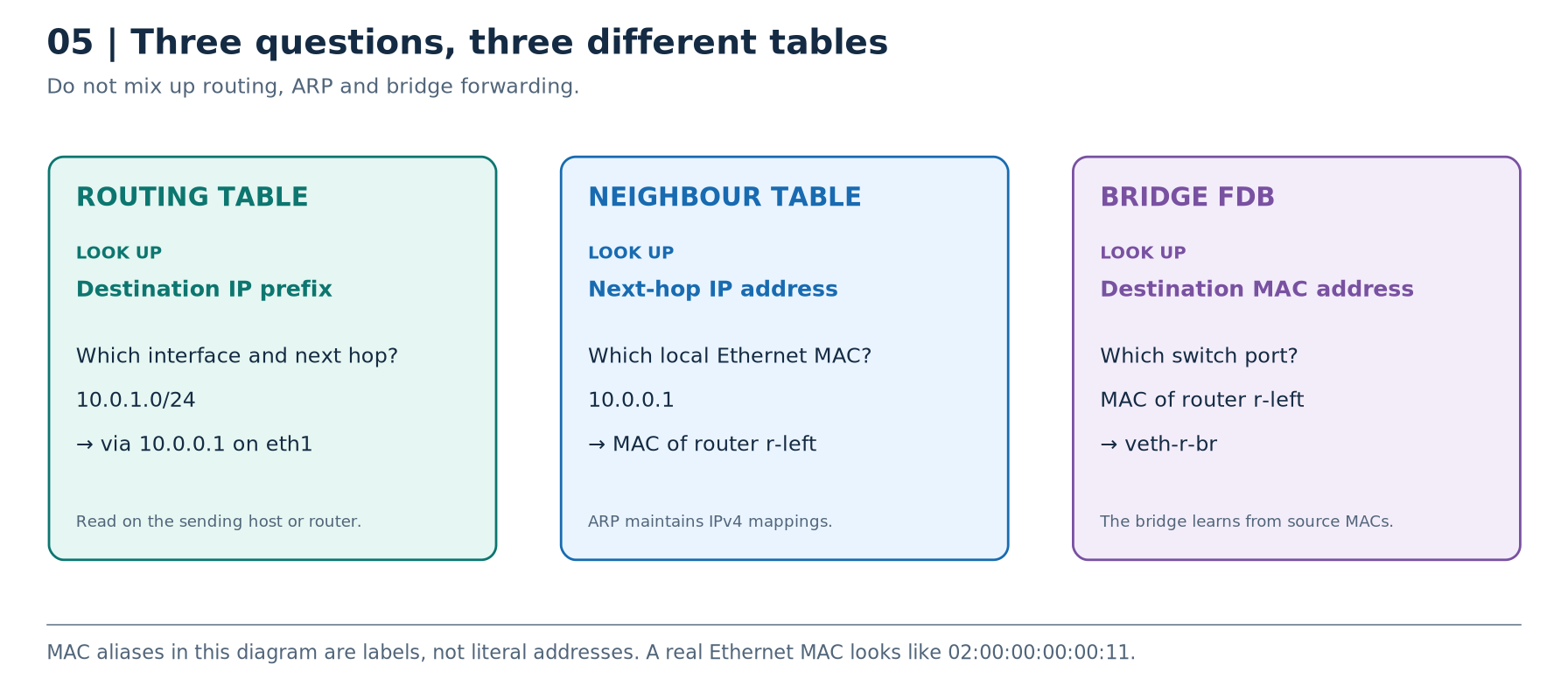
Bridge FDB: “Which port leads to this destination MAC?”
A bridge maintains a forwarding database, or FDB. In our non-VLAN lab, think of its dynamic entries as MAC address → bridge port. The bridge learns from the source MAC of incoming frames: if a frame from MAC-H1 arrives on veth1-br, that is evidence that MAC-H1 is reachable through that port. It then uses the destination MAC to decide where to forward a frame. Bridge forwarding database · Kernel bridging
With the lab's normal learning and forwarding settings, known unicast goes to the relevant port. Broadcast and unknown unicast are flooded to eligible other ports rather than arbitrarily guessed. Flooding does not mean a bridge is permanently a hub; once addresses are learned, it can forward known unicast selectively. VLANs, port states, filtering, and mirroring can alter behaviour, so do not apply the simplified lab model blindly to every production switch.
The three tables, side by side
| Table | Example lookup | Example result | Where we inspect it |
|---|---|---|---|
| Routing table | Destination belongs to 10.0.1.0/24 | Via 10.0.0.1, out eth1 | Sending host or router |
| IPv4 neighbour table | Next hop is 10.0.0.1 | Router's local MAC address | Sending host or router |
| Bridge FDB | Destination is router's MAC | Out veth-r-br | Bridge namespace |
They are separate information stores. Clearing host1's neighbour entry does not clear the bridge's FDB. ARP cache entries and learned bridge entries also have independent lifecycles. ARP cache · FDB management
Remember: route = IP destination to path; ARP = next-hop IP to MAC; FDB = MAC to switch port.
Architecture C - Three hosts on one switched LAN
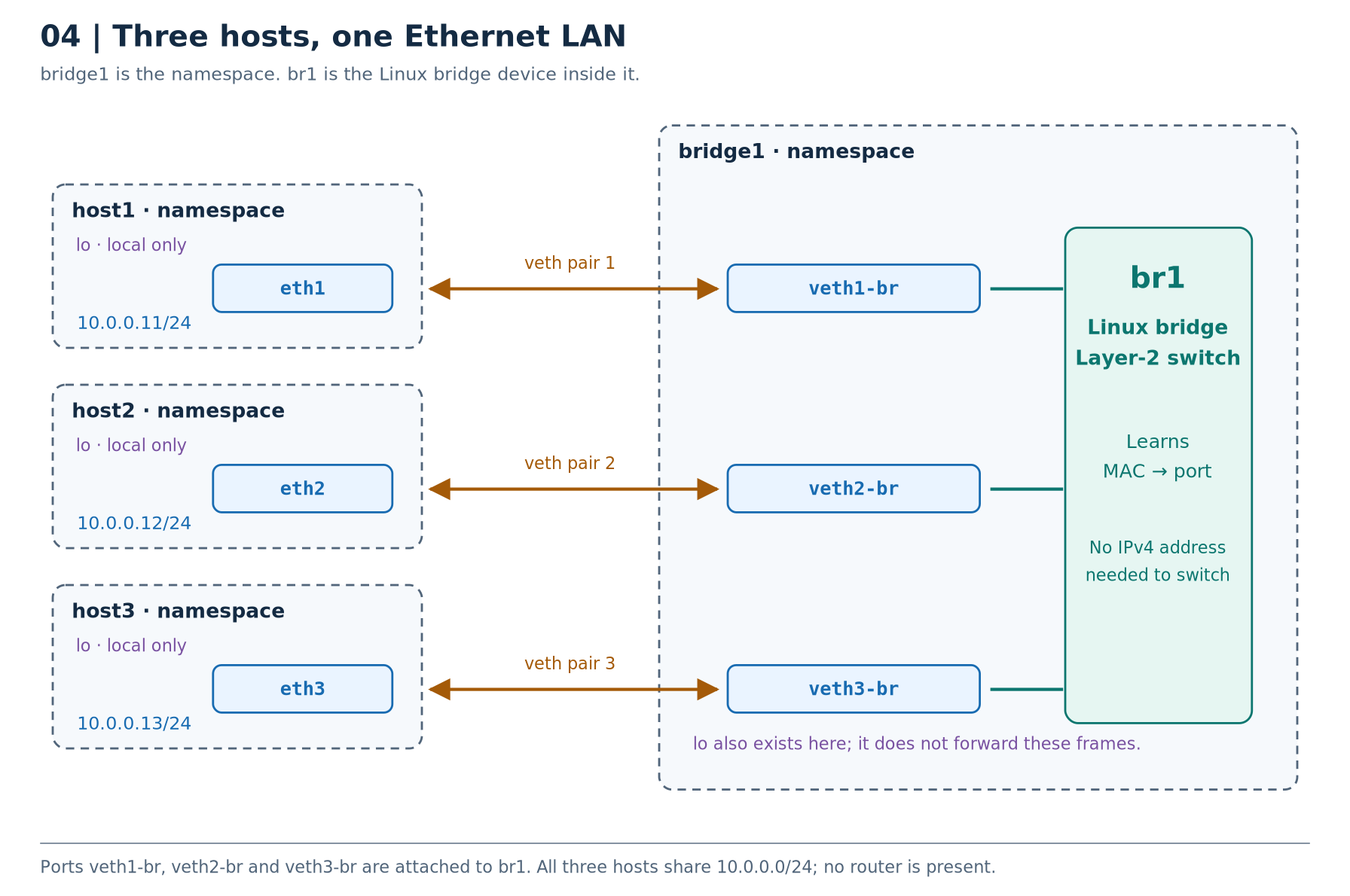
Objects: four namespaces, three veth pairs, and one Linux bridge. The dashed rectangle marks a namespace boundary. Each amber connection is a different veth pair. The blue boxes inside bridge1 are the switch-side endpoints, not the hosts' own interfaces.
| Host interface | Its peer, owned by bridge1 | Bridge membership |
|---|---|---|
host1/eth1 | veth1-br | veth1-br is a port of br1 |
host2/eth2 | veth2-br | veth2-br is a port of br1 |
host3/eth3 | veth3-br | veth3-br is a port of br1 |
The complete host1-to-host2 path is:
host1 process
  → host1 IP stack
  → eth1
  → veth1-br              (its peer in bridge1)
  → br1 forwarding logic
  → veth2-br             (the selected outgoing bridge port)
  → eth2                 (its peer in host2)
  → host2 IP stack
  → host2's recipient
br1 does not need an IPv4 address. Neither do veth1-br, veth2-br, or veth3-br. They provide Layer-2 connectivity; the hosts originate and receive the IP traffic.
Follow the first ping, not just the result
Assume the relevant ARP mappings are absent, the bridge uses its ordinary learning behaviour, and nothing filters the traffic.
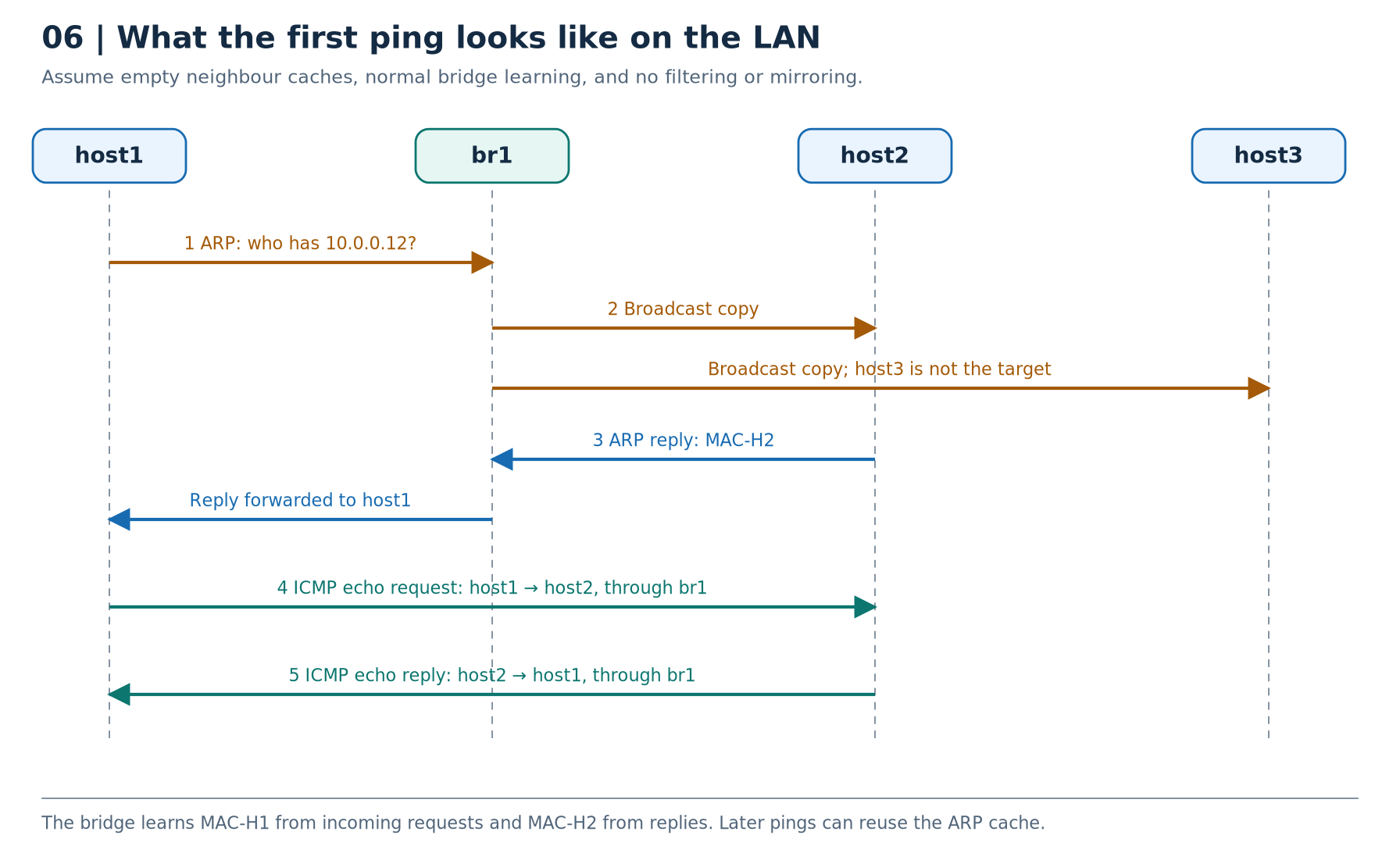
First, choose the path. Host1's route lookup identifies 10.0.0.12 as on-link through eth1.
Next, discover the Ethernet destination. Host1 emits an ARP request. The bridge sees host1's source MAC on veth1-br, learns that location, and forwards the broadcast to the other eligible ports. Host2 recognises its own IP; host3 receives the broadcast but is not the requested owner.
Then learn the reply direction. Host2 replies with its MAC. The bridge learns host2's source MAC on veth2-br and can forward the reply towards host1. Host1 can now address its Ethernet frame to host2.
Finally, exchange ICMP. The echo request and echo reply cross the bridge as unicast frames. While usable neighbour mappings remain, another ping need not start with another broadcast ARP exchange. ARP exchange · ARP cache behaviour · Bridge learning
This is why a capture can show ARP before the first ICMP request but show only ICMP during a later run. A cached mapping is an explanation, not missing traffic.
What this architecture is for: a shared Ethernet LAN with multiple hosts, without a router.
Architecture E - Where the same building blocks appear in containers and VMs
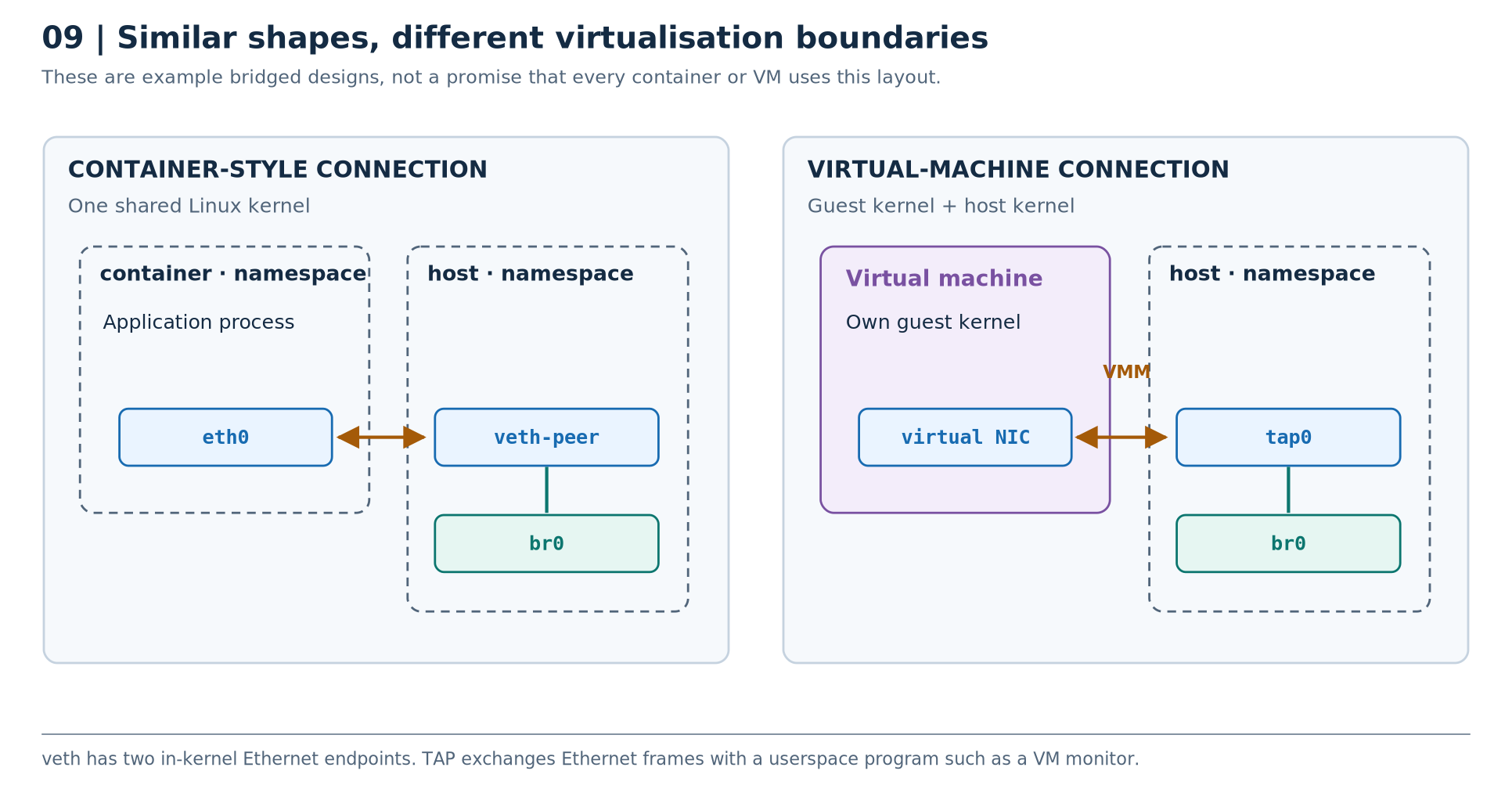
A container-style design can put an application in a network namespace, connect it to a host-side bridge with a veth pair, and optionally route beyond that bridge. That is similar to our lab, although our switch has its own namespace to make the boundaries visible. Containers share the host kernel; a network namespace alone is only the networking part of container isolation. Network namespaces · Red Hat namespace walkthrough
A VM has its own guest kernel. In one common bridged design, its guest-visible virtual NIC exchanges traffic through a virtual-machine monitor and a host-side TAP device, which is attached to a host bridge. This is not the same mechanism as a veth pair. Other VM and container network architectures also exist; the diagram shows examples, not universal rules. Kernel TUN/TAP documentation · QEMU networking
We will not connect the lab to a physical NIC. That keeps all experiments within lab-owned devices and namespaces.
Stage 3 - Replace the cable with a three-host switched LAN
Starting point: Stage 2 works and no foreground ping, server, or capture is left running.
Goal: build Architecture C using the original names host1, host2, host3, bridge1, and br1.
3A. Remove the old direct pair
This is an intentional topology change, not a generic cleanup command:
sudo ip -n host1 link del dev eth1
Deleting this veth endpoint also removes its peer, host2/eth2. Their address assignments disappear with those interfaces. The two namespaces and their loopback devices remain.
sudo ip -n host1 -br link
sudo ip -n host2 -br link
Expected: neither eth1 nor eth2 is present now. veth lifecycle
3B. Create host3 and the switch namespace
sudo ip netns add host3
sudo ip netns add bridge1
sudo ip -n host3 link set dev lo up
sudo ip -n bridge1 link set dev lo up
Bringing up bridge1/lo makes its local networking available; it is not a prerequisite for the bridge's transit frame switching.
Create the actual bridge device inside the switch namespace:
sudo ip -n bridge1 link add br1 type bridge
We now have a namespace called bridge1 containing a bridge called br1. We have not attached any ports yet.
3C. Create one veth pair for each host
For host1:
sudo ip -n host1 link add eth1 type veth peer name veth1-br
sudo ip -n host1 link set dev veth1-br netns bridge1
For host2:
sudo ip -n host2 link add eth2 type veth peer name veth2-br
sudo ip -n host2 link set dev veth2-br netns bridge1
For host3:
sudo ip -n host3 link add eth3 type veth peer name veth3-br
sudo ip -n host3 link set dev veth3-br netns bridge1
Notice the difference from Stage 2. eth1 and eth2 are no longer peers of each other. Their peers are now veth1-br and veth2-br, respectively.
3D. Attach the switch-side endpoints to br1
sudo ip -n bridge1 link set dev veth1-br master br1
sudo ip -n bridge1 link set dev veth2-br master br1
sudo ip -n bridge1 link set dev veth3-br master br1
This creates the bridge-port relationships. Without them, the endpoints being in the same namespace would not automatically make a switch between them. Bridge port attachment
Enable the bridge and its ports:
sudo ip -n bridge1 link set dev br1 up
sudo ip -n bridge1 link set dev veth1-br up
sudo ip -n bridge1 link set dev veth2-br up
sudo ip -n bridge1 link set dev veth3-br up
3E. Configure the host-side endpoints
sudo ip -n host1 addr add 10.0.0.11/24 dev eth1
sudo ip -n host2 addr add 10.0.0.12/24 dev eth2
sudo ip -n host3 addr add 10.0.0.13/24 dev eth3
sudo ip -n host1 link set dev eth1 up
sudo ip -n host2 link set dev eth2 up
sudo ip -n host3 link set dev eth3 up
Do not assign these host addresses to the bridge-side ports. We do not assign an IPv4 address to br1 either.
3F. Prove that the intended objects exist
sudo ip -n host1 -br -4 addr
sudo ip -n host2 -br -4 addr
sudo ip -n host3 -br -4 addr
sudo ip -n bridge1 -br -4 addr
sudo ip -n bridge1 link show master br1
sudo ip netns exec bridge1 bridge link show
Expected: each host's Ethernet endpoint has its own address; br1 has three attached ports; the bridge and those ports have no IPv4 address. bridge1/lo does have its loopback address. IPv6 link-local addresses may appear when you omit -4; they do not mean you configured IPv4 on the bridge.
3G. Verify host-to-host connectivity
sudo ip netns exec host1 ping -n -c 3 10.0.0.12
sudo ip netns exec host1 ping -n -c 3 10.0.0.13
sudo ip netns exec host2 ping -n -c 3 10.0.0.13
Predict: does the traffic need an IP address on br1, a gateway in host1, or IPv4 forwarding enabled in bridge1?
Observe: the pings should work without those additions.
Explain: this is Layer-2 switching between hosts with connected routes for the same /24, not routing between different subnets.
3H. Inspect two different tables
Host1's IPv4 neighbour table:
sudo ip -n host1 -4 neigh show
The bridge's forwarding database:
sudo ip netns exec bridge1 bridge fdb show br br1
Find entries corresponding to the hosts' actual MAC addresses, which you can read with:
sudo ip -n host1 link show dev eth1
sudo ip -n host2 link show dev eth2
sudo ip -n host3 link show dev eth3
The FDB will normally also contain local/permanent and other entries, not only the three learned host entries. Do not assume its entire output must contain exactly three lines. Follow the host MACs you identified. FDB output
3I. Watch ARP and ICMP instead of imagining them
In Terminal A, capture on host2's Ethernet interface:
sudo ip netns exec host2 tcpdump -l -n -i eth2 -e 'arp or icmp'
| Option | Meaning here |
|---|---|
-l | Line-buffer printed output, useful for seeing lines promptly |
-n | Do not resolve addresses into names |
-i eth2 | Capture on this interface |
-e | Include link-layer header information, such as Ethernet MACs |
'arp or icmp' | Restrict this capture to ARP or ICMP traffic |
These are tcpdump options, not ip options. tcpdump manual
In Terminal B, clear only the relevant lab mapping and send a small ping:
sudo ip -n host1 neigh flush to 10.0.0.12 dev eth1
sudo ip netns exec host1 ping -n -c 2 10.0.0.12
You should observe the ARP request, ARP reply, and ICMP exchange. Below is an illustrative capture; MAC-H1 and MAC-H2 stand for your actual generated MAC addresses:
MAC-H1 > ff:ff:ff:ff:ff:ff, ARP, Request who-has 10.0.0.12 tell 10.0.0.11
MAC-H2 > MAC-H1, ARP, Reply 10.0.0.12 is-at MAC-H2
MAC-H1 > MAC-H2, IPv4, 10.0.0.11 > 10.0.0.12: ICMP echo request
MAC-H2 > MAC-H1, IPv4, 10.0.0.12 > 10.0.0.11: ICMP echo reply
Read the first line as: “Host1 is broadcasting a question: who owns 10.0.0.12? Tell the sender at 10.0.0.11.” The word tell identifies the sender's protocol address; it does not identify a router.
Repeat the ping without clearing the mapping:
sudo ip netns exec host1 ping -n -c 2 10.0.0.12
Expected: often just ICMP while the cached mapping is usable. Additional neighbour maintenance traffic is possible; the important point is that there is not a compulsory new ARP broadcast for every echo request.
Stop the capture with Ctrl+C in Terminal A.
3J. Why host3 sees a broadcast but not all unicast
Start this capture in Terminal A:
sudo ip netns exec host3 tcpdump -l -n -p -i eth3 -e 'arp or icmp'
In Terminal B:
sudo ip -n host1 neigh flush to 10.0.0.12 dev eth1
sudo ip netns exec host1 ping -n -c 2 10.0.0.12
Host3 should see host1's ARP broadcast. With the lab's ordinary learning behaviour and no mirroring, it should not see the subsequent host1-to-host2 unicast ICMP exchange. The switch learns the needed MAC locations during the exchange. -p tells tcpdump not to request promiscuous mode on host3's interface. Capture options · Bridge learning
A production capture can differ if unknown unicast is flooded, a monitor port is configured, or the forwarding settings differ. Our observation is about the defined lab, not a guarantee for every switched network.
Stop the capture with Ctrl+C.
3K. Separate network reachability from the listening address
In Terminal A, using the same LAB_WEB variable from Stage 1:
sudo ip netns exec host1 python3 -m http.server 8000 --bind 127.0.0.1 --directory "$LAB_WEB"
In Terminal B, try both network and application tests from host2:
sudo ip netns exec host2 ping -n -c 2 10.0.0.11
sudo ip netns exec host2 curl --noproxy '*' --max-time 2 http://10.0.0.11:8000/
Predict: the ping succeeds, but the HTTP request fails. The server listens on host1's loopback address, not its Ethernet address.
Stop the server in Terminal A, then start it with an IPv4 wildcard listener:
sudo ip netns exec host1 python3 -m http.server 8000 --bind 0.0.0.0 --directory "$LAB_WEB"
Repeat the HTTP request from Terminal B:
sudo ip netns exec host2 curl --noproxy '*' --max-time 2 http://10.0.0.11:8000/
Expected: the page is now reachable. You changed the listener, not the bridge, the route, or the veth pairs. Clients still use the server's concrete address, 10.0.0.11, not 0.0.0.0. Socket binding · Python server binding
Stop the server with Ctrl+C before continuing.
Stage 3 checkpoint: you can explain the namespace/interface/bridge distinction, follow ARP, locate a learned MAC, and distinguish a listener problem from a link problem.
What these operations do
This is the checklist that prevents most beginner misunderstandings:
| Action | What it does | What it does not do |
|---|---|---|
| Create a bridge | Creates the software switching device | Attach every interface to it automatically |
| Attach a port to a bridge | Adds that interface to the bridge relationship | Enable routing between different IP subnets |
Troubleshooting checks
Use this table against the known lab topology. Do not “fix” everything at once: find the first observation that disagrees with the design.
| Ask this question | Inspect | What a discrepancy suggests |
|---|---|---|
| Is the switch port actually attached? | sudo ip -n bridge1 link show master br1 | Veth endpoint is present but not a port of the bridge. |
| Has the switch learned the expected MAC location? | sudo ip netns exec bridge1 bridge fdb show br br1 | Check traffic, port state, MAC addresses, and topology. |
| Is the application listening on the right address? | sudo ip netns exec host1 ss -lntp | A working network can still have no listener, a loopback-only listener, or an unhealthy application. |
ss -lntp means listening TCP sockets, numeric addresses/ports, and process information when permissions permit. Firewall policy can also block a correct path; on an existing system, inspect the relevant namespace's rules rather than indiscriminately flushing them. Our newly built lab does not install filtering rules. ss manual · Network-namespace isolation
Review questions
Try each answer before reading the explanation.
Question: br1 has no IPv4 address. Can it still switch frames between three hosts?
Answer
Yes. Ordinary Layer-2 switching does not require the bridge itself to be an IPv4 endpoint.
Why does the three-host bridge topology need three veth pairs?
Answer
Each host needs a separate link to a bridge port. A veth pair has two endpoints, not an arbitrary number of endpoints. The bridge switches between those three links.
In the switched topology, is host1's eth1 the peer of host2's eth2?
Answer
No. Host1's eth1 is paired with veth1-br. Host2's eth2 is paired with veth2-br. The bridge connects the switch-side ports. eth1 and eth2 were peers only in the earlier direct-link stage.
Why can br1 forward a ping without an IPv4 address?
Answer
It is switching the Ethernet frame that carries the IP packet. It does not need to be an IPv4 recipient merely to perform that Layer-2 function.
What is learned from the source MAC, and what is looked up using the destination MAC?
Answer
The bridge learns the source MAC's location from the incoming port. It looks up the destination MAC to select the outgoing port. Host ARP learning is a different mechanism.
Why did HTTP start working after changing --bind 127.0.0.1 to --bind 0.0.0.0?
Answer
The server began accepting IPv4 connections addressed to host1's non-loopback address as well. The links, bridge, and routes were already working. This was a listener-binding issue.
Ready for Lesson 4
Keep the working three-host LAN: host1, host2, host3, and bridge1, with three separate veth pairs attached to br1. The router and fourth host have not been created. Stop every capture and the HTTP server with Ctrl+C in its terminal.
Keep the shell containing LAB_WEB open and leave the test directory in place for final cleanup. If you finish here, use the cleanup instructions for these four namespaces and that directory, omitting router1 and host4.