Linux Networking - Lesson 1: Interfaces, namespaces, and loopback
Understand interfaces, frames, namespaces, and loopback, then create two isolated hosts and test how local services behave.
· 18 min read
Goal: distinguish interfaces, frames, namespaces, and loopback, then prove that two isolated hosts have independent local services.
Prerequisites: basic terminal use, a Linux machine or VM with sudo, and permission to create network namespaces. The preparation section below checks the tools.
Starting topology: none of host1, host2, host3, bridge1, router1, or host4 exists. There are no lab interfaces or processes.
Read the concepts first. The commands in the explanation illustrate objects; the sequential lab starts at Preparation.
Course overview | Next lesson: 2
A network is more than an IP address
Imagine two laptops. Giving one the address 10.0.0.11/24 and the other 10.0.0.12/24 does not connect them. They still need a usable communication path: a cable, a wireless link, or a virtual link. The operating system also needs to know which interface to use and, when necessary, which router should receive the traffic next.
Separate these four questions:
| Question | Relevant concept |
|---|---|
| Where can traffic enter or leave this network stack? | Interface |
| What actually connects the endpoints? | Link, such as Ethernet or a veth pair |
| How does traffic reach another local endpoint? | Ethernet addressing and, when present, switching |
| How does traffic reach an IP destination through the appropriate next hop? | Routing |
A host is an endpoint that originates or receives traffic. A LAN, or local area network, connects nearby or logically adjacent endpoints. In our simple switched lab, the LAN is one Ethernet broadcast domain: a broadcast can reach the other attached hosts. The Internet is not required for a LAN to function.
Remember: configuring an address describes a destination or interface; it does not create a connection.
Frames, packets, protocols, and ports
Networking uses layers because different problems require different information. For this lesson, concentrate on these layers rather than memorising all seven OSI layer names.
| Level | What it handles | Example information |
|---|---|---|
| Application | What the programs want to do | An HTTP request |
| Transport | Communication between application endpoints | TCP or UDP port numbers |
| Network, usually called Layer 3 | Delivery towards an IP destination | Source and destination IP addresses |
| Link, usually called Layer 2 | Delivery over the current local link | Source and destination Ethernet MAC addresses |
A protocol is a set of rules and message formats that communicating systems understand. An IP packet is a unit of IP traffic. An Ethernet frame is the Layer-2 unit that carries data across an Ethernet link; its payload may be an IP packet. IP specification · TCP specification · UDP specification
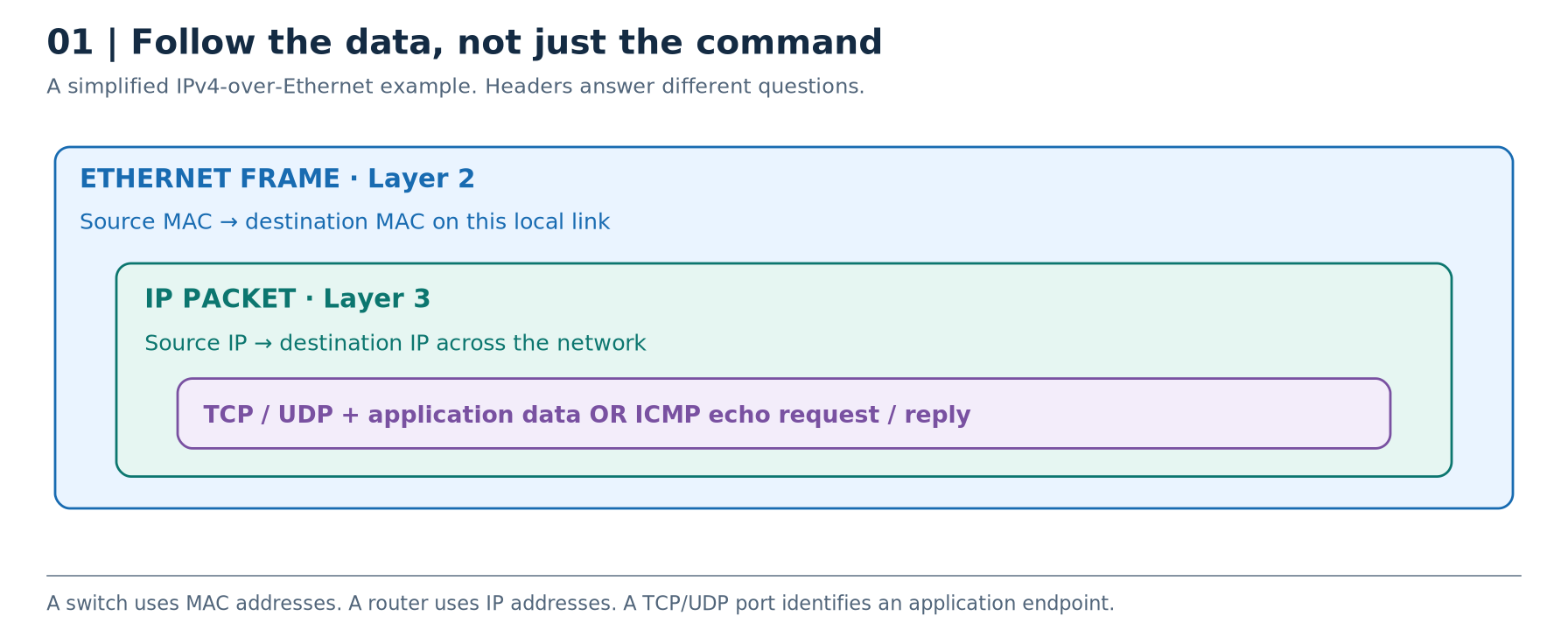
Read the image from the outside in: the Ethernet header answers “which local Ethernet destination?”, while the IP header answers “which IP destination?”. These are not necessarily the same device. A router can be the local Ethernet destination while another host is the final IP destination.
The word port has two different meanings you must keep separate. A switch port is a connection point on a switch; in a Linux bridge, it is an attached interface. A TCP or UDP port, such as TCP 8000, is a number used to distinguish application endpoints. Attaching an interface to a bridge does not open TCP port 8000.
ping sends ICMP echo requests and receives echo replies; it is not an HTTP test and does not use a TCP or UDP destination port. A successful ping is useful evidence of IP reachability, but it does not prove that a website, database, or application is healthy. ping manual · ICMP specification
Remember: a frame is the local-link envelope; a packet carries the IP addressing inside it.
What is a network interface?
A network interface is an object through which a network stack sends or receives traffic. Linux exposes interfaces through commands such as ip link. An interface can be backed by physical hardware, by a virtual device presented to a VM, or entirely by software inside Linux. Device interface · Device management
An interface has properties such as a name, a device type, an administrative state, and an MTU. An Ethernet interface also has a MAC address. It can have no IP addresses, one IP address, or several. An interface and an IP address are not the same object. Address management
For example, in our lab:
Name:       eth1
Type:       veth endpoint
Namespace:  host1
IPv4:       10.0.0.11/24, once we assign it
Role:       host1's connection to the lab LAN
Names do not reliably tell you the type
eth0, eth1, ens3, enp2s0, veth123, and br0 are names. Some follow system naming conventions, while others were chosen by a person or program. We can name a veth endpoint eth1; that does not turn it into physical hardware.
Use these commands to examine the object rather than guessing from its name:
ip -br link
ip -d link show
ip -br addr
link shows devices and link properties. addr shows address assignments. -br asks for a brief view; -d asks for additional details, useful for identifying virtual device types. ip command
Interface types: learn the first four, recognise the rest
| Device or type | What it is | What it is not |
|---|---|---|
| Ethernet NIC | An interface for an Ethernet connection. It may be physical or presented virtually to a guest OS. | Not necessarily a router or switch. |
Loopback, normally lo | A software interface for local delivery within the same network namespace. | Not a cable to another namespace. |
| Veth endpoint | One of two connected virtual Ethernet interfaces. | Not a multi-port switch. |
Linux bridge, such as br1 | A software Layer-2 switch exposed as a network device. Other interfaces can become its ports. | Not automatically an IP router. |
| Wi-Fi interface | An interface to a wireless link. | Not interchangeable with a veth cable in every bridging configuration. |
| TAP | A virtual interface exchanging Ethernet frames with a userspace program, such as a virtual-machine monitor. | Not automatically paired with another TAP interface. |
| TUN | A virtual interface exchanging IP packets with a userspace program; often used in tunnelling designs. | Not an Ethernet interface carrying ordinary Ethernet headers. |
| VLAN interface | A logical interface associated with an 802.1Q VLAN on another device. | Not a separate physical cable or an automatic router. |
| Bond | A logical device grouping multiple member interfaces for modes such as redundancy or traffic distribution. | Not a mechanism for giving hosts separate network stacks. |
| VXLAN device | A device that encapsulates Ethernet traffic over an IP/UDP network. | Not the simple, local two-ended connection of a veth pair. |
The first four are the focus of this course. The other rows are a recognition guide, not additional configuration you need for this lab. veth · Linux bridge · TUN/TAP · VLAN and bond types · VXLAN
What is a network namespace?
A network namespace gives processes a separate view of networking resources: interfaces, IP protocol stacks, routes, neighbour information, firewall rules, and socket/port spaces. An interface is visible within the namespace that owns it. Network namespaces
We will use namespaces as lightweight simulated hosts:
One Linux kernel
├── Normal shell's network namespace
├── host1: its own interfaces, routes, neighbours and sockets
├── host2: its own interfaces, routes, neighbours and sockets
├── host3: its own interfaces, routes, neighbours and sockets
└── bridge1: its own interfaces, including the bridge br1
A network namespace is not a virtual machine and not a running process. Multiple processes can use it; it can also exist without a process actively running inside it. Creating only a network namespace does not give it a separate kernel, filesystem, or hostname. Other namespace types address other forms of isolation. Namespace overview · Named namespace lifecycle
The namespace name does not create a network role
Naming a namespace bridge1 does not create a bridge inside it. Naming one router1 does not enable routing between interfaces. These are ordinary names; the devices and configuration determine the role.
Also distinguish the initial or default network namespace from the root user. A root process can run inside another network namespace. sudo changes privileges; it does not, by itself, mean “enter the initial namespace”.
Which namespace does a command inspect?
ip addr
This examines the calling process's current network namespace.
sudo ip -n host1 addr
This tells the ip program to inspect host1.
sudo ip netns exec host1 ping -n -c 3 10.0.0.12
This runs another program, ping, in host1. The distinction matters because a route in the normal shell's namespace is not automatically a route in host1. ip-netns manual
Remember: before interpreting networking output, ask “which network namespace am I looking at?”
What exactly is lo?
lo is Linux's usual name for the loopback interface. It provides a local networking path: traffic can go from a process into its network stack and back to a local recipient without using an external Ethernet connection.
The familiar IPv4 loopback address is 127.0.0.1; Linux treats the 127.0.0.0/8 range as loopback. The IPv6 loopback address is ::1. The hostname localhost normally resolves to a loopback address. lo is the interface name; 127.0.0.1 is an address, and localhost is a name. Linux IPv4 addresses · IPv6 loopback · Localhost name
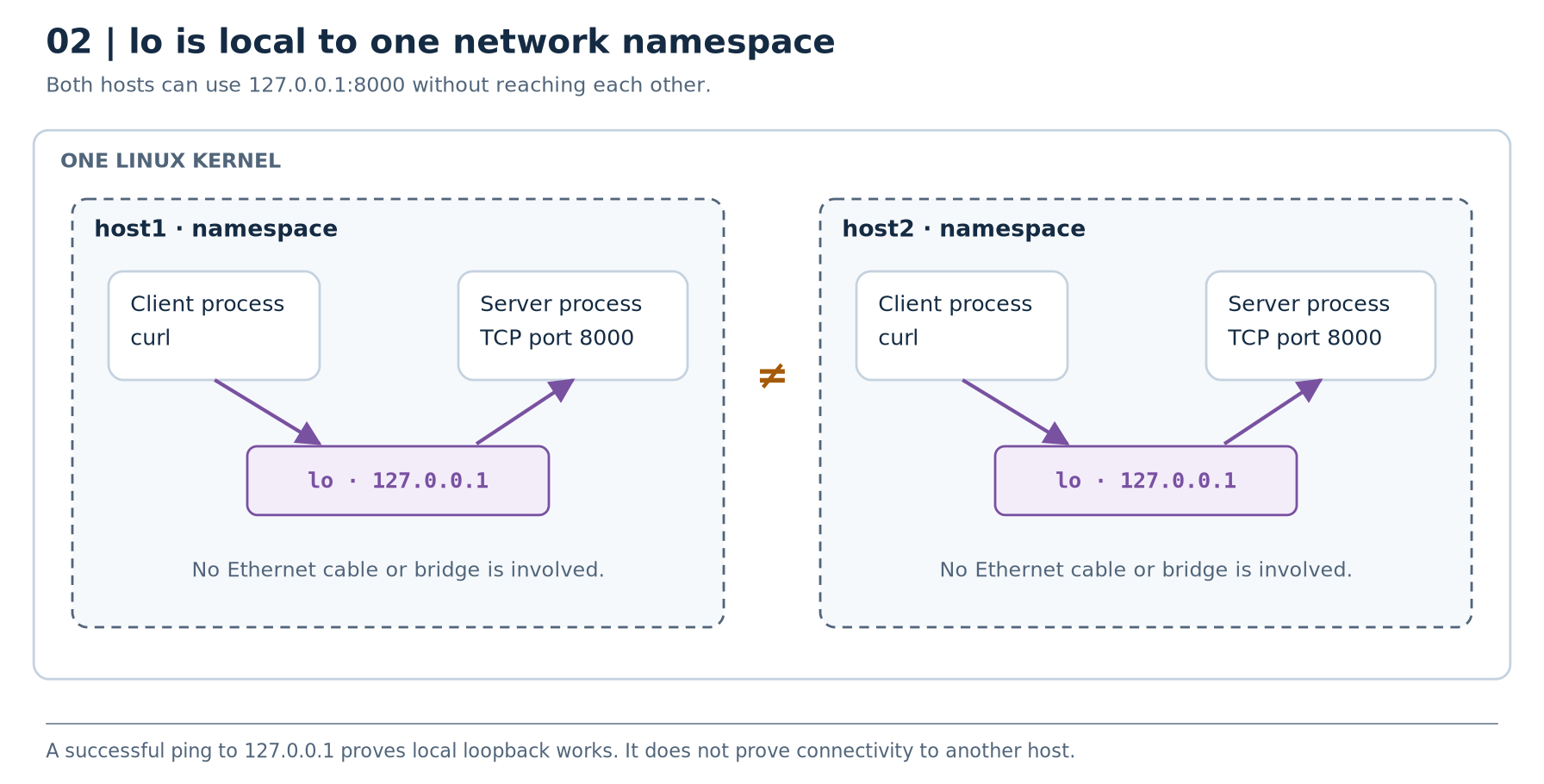
“Local” means this network namespace
Suppose a server in host1 listens on 127.0.0.1:8000. A client in host1 can connect to it. A client in host2 connecting to 127.0.0.1:8000 is trying to reach a server in host2, not the server in host1. The same address is not a shared meeting point between the namespaces.
That is why two separate network namespaces can independently have a listener on the same local address and TCP port. Within a shared namespace, the normal binding/conflict rules still apply. Network namespace socket isolation · IP socket binding
When do we use it?
A program may expose a development HTTP server, a local database, or an administrative endpoint only on loopback. Another local program can use that endpoint without exposing it through a non-loopback listening address.
In an ordinary configuration, binding to 127.0.0.1 limits a service to loopback. Binding to 0.0.0.0 means accepting IPv4 connections for all local IPv4 addresses in that namespace; it does not bypass firewall rules or create routes. 0.0.0.0 is a wildcard for the listener, not the address clients should use to reach it. Linux IPv4 socket addresses
What a loopback ping does not prove
ping -n -c 3 127.0.0.1
This does not test a veth pair, a bridge, a gateway, another host, or Internet connectivity. It is a local test.
There is an additional trap: pinging your own non-loopback IP address is not a reliable link test either. Linux normally has a local route for addresses assigned to the namespace, so traffic to its own address can be delivered locally. Later, ip route get will reveal that path. Local routes
Why bring lo up in the lab?
A newly created network namespace has a loopback device that normally starts administratively down. We enable it so local network communication works. That does not connect the namespace to another host. Conversely, loopback is not what a bridge uses to forward frames between bridge ports. Namespace configuration · Bridge forwarding
Remember:
lomeans “back into this network stack”, not “out to the other hosts”.
Ethernet and MAC addresses
Ethernet frames carry source and destination MAC addresses. A typical Ethernet MAC is written as six hexadecimal bytes, for example 02:00:00:00:00:11. Virtual Ethernet interfaces also have MAC addresses; a MAC address is not proof of a physical network card. Ethernet address format and resolution · Virtual Ethernet devices
For the normal unicast traffic in our lab, the source MAC identifies the Ethernet sender on the current link, and the destination MAC identifies the intended Ethernet recipient on that link.
Unicast targets one recipient. Broadcast uses the Ethernet destination ff:ff:ff:ff:ff:ff, reaching eligible endpoints in the same broadcast domain. Multicast targets a group; it exists, but our exercises focus on unicast and ARP broadcasts.
On a same-LAN ping, the Ethernet destination is the other host. On a ping through a router, the first Ethernet destination is the router's local interface. The final IP destination remains the remote host. ARP next-hop resolution · IPv4 forwarding
For clarity, diagrams sometimes use labels such as MAC-H1 and MAC-R-left. They are explanatory aliases, not literal values you can paste into a command. The lab lets Linux generate actual MAC addresses; you inspect them with ip link.
Remember: an IP destination may be many hops away; the Ethernet destination is for the current local hop.
Architecture A - Local communication only
Objects: one namespace, its loopback interface, and local processes.
Path: client process → local networking/loopback → local server process.
There is no Ethernet connection to another namespace. The loopback illustration in the loopback explanation shows two separate examples side by side, not a connection between them. A second namespace can use the same loopback address independently.
What this architecture is for: local services and the first lab checkpoint.
What it cannot prove: that another host is reachable.
Preparation - A safe, repeatable starting point
Use a Linux machine or a Linux VM where you have permission to create network namespaces and virtual devices. A restricted container may refuse these operations even when its shell says root; privileges and kernel restrictions still matter. Capabilities
For Debian or Ubuntu, install the tools when they are missing:
sudo apt-get update
sudo apt-get install -y iproute2 iputils-ping tcpdump procps util-linux python3 curl
Other distributions use their own package managers and may use different package names. ip and bridge belong to iproute2; sysctl is provided by procps on Debian/Ubuntu. The HTTP experiment uses Python's simple development server, not a production web server. iproute2 commands · Python HTTP server
Check what is available:
command -v ip bridge ping tcpdump sysctl python3 curl
sudo ip netns list
Reserved lab namespace names: host1, host2, host3, bridge1, router1, and host4.
If any of those already exist, stop before creating anything. Determine whether they are your previous lab or another workload. Use a fresh environment, or use the cleanup section only after confirming ownership and stopping the lab's processes. Do not remove a namespace merely because its name matches this document.
Execution rules
Run commands from your normal Linux shell. Each namespace-targeting command includes -n NAME or ip netns exec NAME. Use a second terminal only when a server or packet capture is explicitly running in the first one.
The lab creates and modifies interfaces only inside the lab namespaces. It does not attach a physical NIC, alter the normal shell's default route, flush a firewall, or connect the lab to an external network. Never substitute your real management interface for one of the lab interface names.
Commands are not idempotent: an add operation can correctly fail if you run it twice. An unexpected error is a reason to inspect the current state, not to continue pasting the remaining steps. Temporary names and interface indices can differ from the illustrative outputs below.
Stage 1 - Create two isolated hosts and understand lo
Starting point: none of the reserved namespaces exists.
Goal: prove that loopback works independently in each namespace and does not connect them.
1A. Create the network namespaces
sudo ip netns add host1
sudo ip netns add host2
We have created two network contexts, not connected two hosts. Inspect them:
sudo ip netns list
sudo ip -n host1 -br link
sudo ip -n host2 -br link
Expected observation: each has a lo device, normally down at this point, and no lab Ethernet interface. You have not created eth1 or eth2 yet. Named namespace operations
1B. Enable each loopback device
sudo ip -n host1 link set dev lo up
sudo ip -n host2 link set dev lo up
Inspect only the IPv4 view:
sudo ip -n host1 -br -4 addr show dev lo
sudo ip -n host2 -br -4 addr show dev lo
A typical result is:
lo UNKNOWN 127.0.0.1/8
UNKNOWN is the operational-state field, not a statement that loopback is broken. Operational states
1C. Predict, observe, explain
Predict: can both commands succeed without any connection between the namespaces?
sudo ip netns exec host1 ping -n -c 3 127.0.0.1
sudo ip netns exec host2 ping -n -c 3 127.0.0.1
Observe: both should receive replies.
Explain: each ping stays within its own network namespace. Neither command reached the other host. The success is not evidence of an Ethernet connection.
1D. Make “localhost is separate” visible with a service
In Terminal A, create a temporary directory containing only our test page:
LAB_WEB=$(mktemp -d)
printf 'Hello from the host1 lab server\n' > "$LAB_WEB/index.html"
mktemp -d creates a new directory. LAB_WEB stores its path in this shell. Keep this terminal open; we reuse the directory later. The directory is on the ordinary filesystem - network namespaces do not provide filesystem isolation.
Start a server listening only on host1's IPv4 loopback address:
sudo ip netns exec host1 python3 -m http.server 8000 --bind 127.0.0.1 --directory "$LAB_WEB"
The command stays in the foreground. Leave it running. Python server options
In Terminal B, test from host1:
sudo ip netns exec host1 curl --noproxy '*' --max-time 2 http://127.0.0.1:8000/
Expected: Hello from the host1 lab server.
Now test exactly the same address from host2:
sudo ip netns exec host2 curl --noproxy '*' --max-time 2 http://127.0.0.1:8000/
Expected: failure because there is no listener on host2's own loopback port 8000. It did not try to reach host1. --noproxy '*' prevents an inherited proxy setting from changing this experiment; --max-time 2 bounds the request time. curl options
Stop the server with Ctrl+C in Terminal A before proceeding.
Stage 1 checkpoint: two namespaces, two working loopback devices, zero links between the hosts.
What these operations do
This is the checklist that prevents most beginner misunderstandings:
| Action | What it does | What it does not do |
|---|---|---|
| Create a network namespace | Establishes a separate networking context | Connect it to other namespaces |
Enable lo | Enables its loopback device | Create a link to another host |
Troubleshooting checks
Use this table against the known lab topology. Do not “fix” everything at once: find the first observation that disagrees with the design.
| Ask this question | Inspect | What a discrepancy suggests |
|---|---|---|
| Am I looking in the right namespace? | sudo ip netns list; sudo ip -n host1 -br addr | You may be inspecting a different network stack. |
Review questions
Try each answer before reading the explanation.
Question: host1 and host2 both have lo and 127.0.0.1. Are they connected to each other?
Answer
No. Each address refers to its own network namespace. We have not yet supplied any link between them.
Host1 can ping 127.0.0.1, but not host2. What did the successful ping prove?
Answer
Only that host1's loopback path works. It did not exercise the veth pair, bridge, or remote host. Compare Stage 1 with the link-down experiment in Stage 2.
Ready for Lesson 2
You should have only host1 and host2, with their loopback interfaces enabled and no link between them. Stop the HTTP server with Ctrl+C in Terminal A. Keep that terminal open: its LAB_WEB variable points to the temporary directory reused in Lesson 3.
Leave both namespaces in place. If you are stopping the course, use the cleanup instructions for just these two namespaces and the test directory.