Linux Networking - Lesson 2: Connecting two hosts
Connect two Linux namespaces with a veth pair, configure IPv4 addresses, inspect routes and ARP, and diagnose a disabled link.
· 13 min read
Goal: connect two isolated hosts with one veth pair and explain address assignments, connected routes, ARP, and link state.
Prerequisites: complete Lesson 1 in the same Linux environment.
Starting topology: host1 and host2 exist, each with lo enabled. Neither has a lab Ethernet interface, and no link connects them. The Lesson 1 Python server is stopped.
Carry-over: keep Terminal A open with its LAB_WEB variable and temporary directory from Lesson 1. This lesson does not use the directory, but Lesson 3 does. If that shell was closed, follow the recovery instructions in Lesson 3 before its HTTP exercise. Do not rerun the namespace-creation commands from Lesson 1.
Previous lesson: 1 | Course overview | Next lesson: 3
What is a veth pair?
A veth pair consists of two interconnected virtual Ethernet devices. A frame transmitted through one endpoint is received at the other. The endpoints can be in the same network namespace or in different ones. veth manual
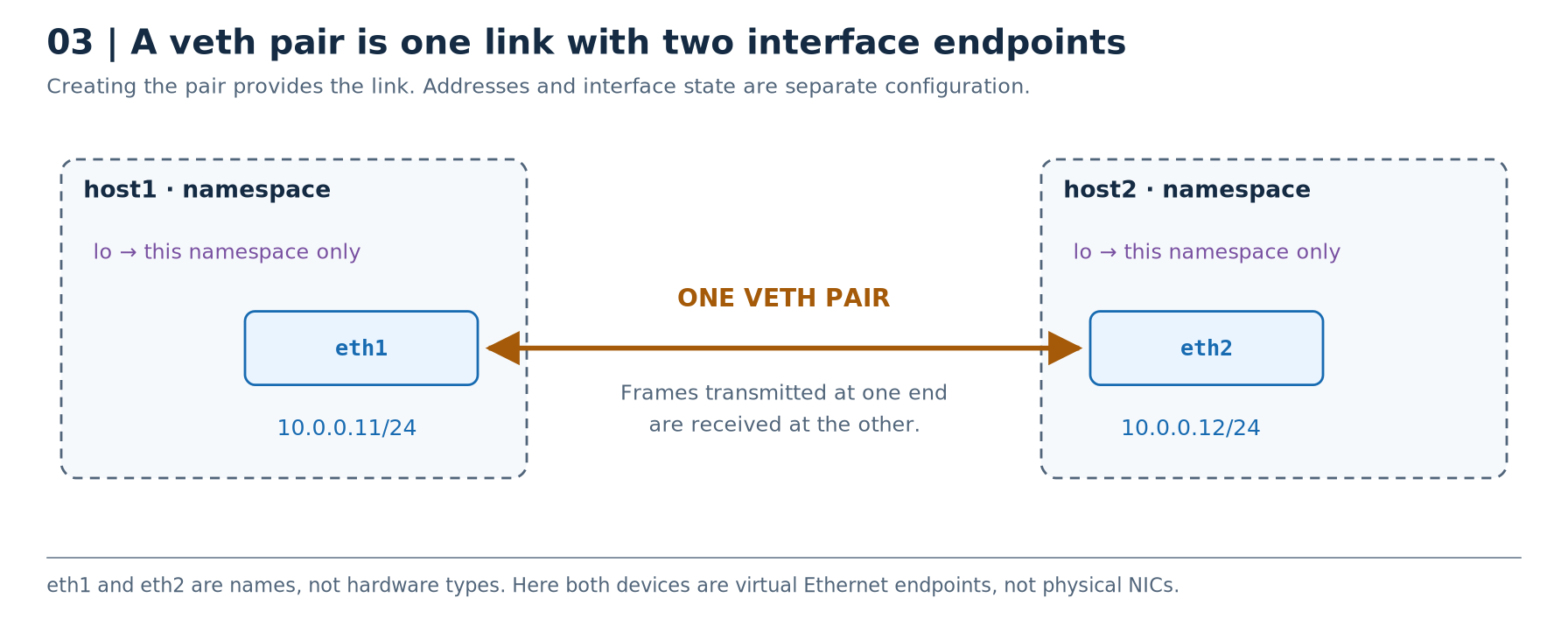
The useful analogy is a virtual Ethernet cable with an interface at each end. The cable analogy is not a third kernel interface: the pair contains two interface objects.
For the direct architecture above, eth1 belongs to host1 and eth2 belongs to host2. They have different names and MAC addresses. The pair itself does not assign their IP addresses, add a gateway, or provide a third endpoint.
A bridge changes the arrangement: one veth pair connects host1 to a bridge-side port, a different pair connects host2 to another bridge-side port, and the bridge switches frames between those ports. We do not use one three-ended veth pair.
Deleting a veth endpoint also removes its peer. Taking an endpoint down is a different operation: it disables the link without deleting the pair. This distinction will be important when we replace the direct link with a switched network. veth lifecycle · Link operations
Remember: two hosts directly connected need one pair; three hosts separately attached to a bridge need three pairs.
IP addresses, subnets, and CIDR
An IPv4 address is 32 bits. The suffix in an address such as 10.0.0.11/24 is the prefix length: 24 bits define the network prefix, leaving 8 bits for addresses within that prefix. CIDR notation expresses networks using these prefixes. CIDR
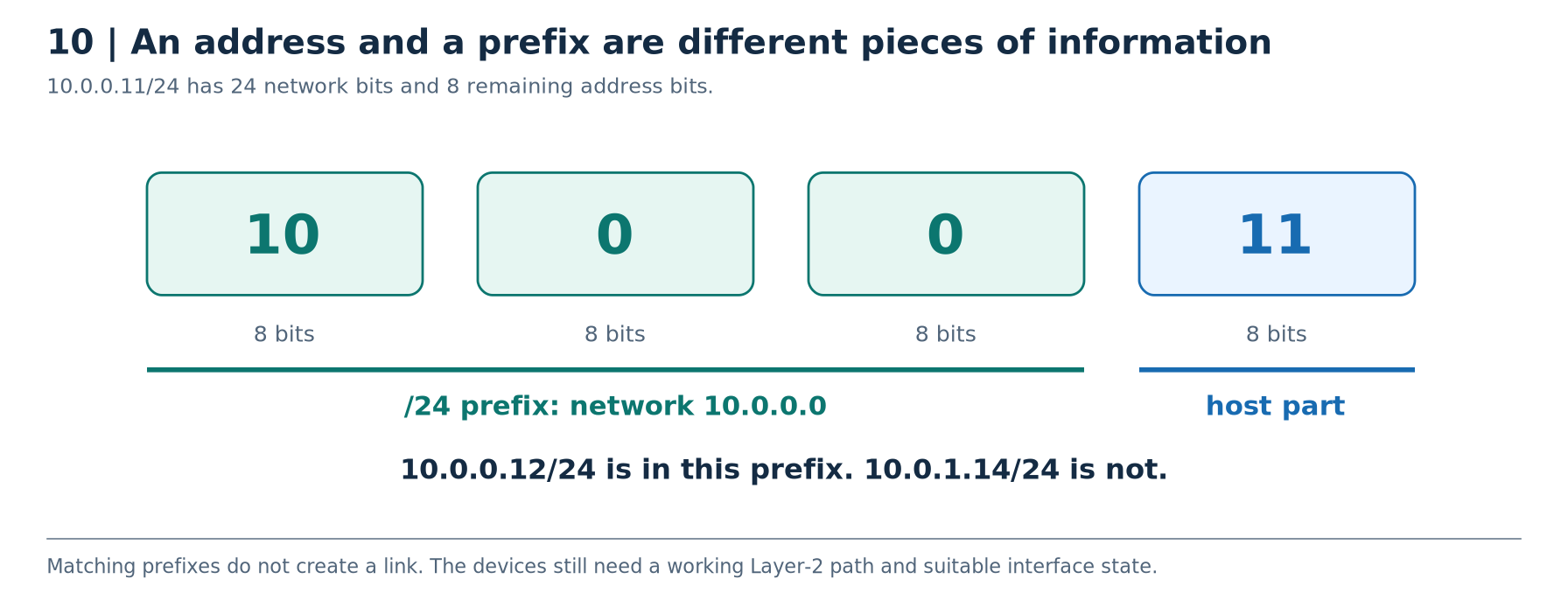
For this particular /24:
| Value | Meaning |
|---|---|
10.0.0.11 | Host1's assigned address |
/24 | Prefix length |
255.255.255.0 | Equivalent subnet mask |
10.0.0.0/24 | Network prefix |
10.0.0.255 | Broadcast address for this /24 |
10.0.0.1 through 10.0.0.254 | Conventional host address range used in this lesson |
These are consequences of the chosen prefix. An address ending in .255 is not universally a broadcast address regardless of prefix. We use conventional host addresses to keep the exercises portable and easy to recognise. Linux IPv4 special addresses
With our normal connected routes, host1 regards 10.0.0.12 as on-link through its 10.0.0.11/24 interface. 10.0.1.14 is outside that prefix. Reaching it requires a suitable route, which can point through a router.
Two independent requirements
The right prefix does not provide a physical or virtual link. Two isolated namespaces can have addresses in 10.0.0.0/24 and still have no path between them.
Conversely, attaching two interfaces to the same unsegmented bridge does not automatically make their IPv4 addresses part of the same subnet. Two hosts with different /24 networks can share Ethernet connectivity while lacking the routes needed for IP communication. This distinction is about Layer-2 topology versus Layer-3 addressing.
Remember: the prefix describes the IP network; it does not build the Ethernet network.
“UP” has more than one meaning
An interface can be administratively enabled while its link is not usable. In detailed output, UP inside the flags means administratively enabled; LOWER_UP means the driver reports lower-layer carrier. The operational state is another field. state UNKNOWN is not automatically a fault: loopback commonly works in that state. Kernel operational states
Similarly, bringing an interface up does not assign an address, create a route to every network, or attach it to a bridge. Those are separate operations.
The MTU is the maximum transmission unit of the interface; for an Ethernet IP interface, an MTU of 1500 normally permits an IP packet of up to 1500 bytes, not a complete Ethernet frame of only 1500 bytes. MTU matters when links or tunnels impose different size limits, but the lab leaves it unchanged. Interface controls · IP specification
Remember: existence, type, namespace, state, address, and bridge membership are separate properties.
Routing tables and connected routes
The routing table helps Linux decide how to handle an IP destination. For ordinary traffic in our lab, a route identifies an outgoing interface and may specify a next hop: the neighbouring router to which the packet should be sent. Linux also maintains local routes for its own addresses. Route types and lookup
After we assign 10.0.0.11/24 to eth1 and bring it up, the normal connected route looks like:
10.0.0.0/24 dev eth1 proto kernel scope link src 10.0.0.11
Read it as: “For this connected prefix, use eth1; 10.0.0.11 is the preferred source address shown for this route.” No gateway is listed because this is an on-link route.
In Lesson 4, we will add:
10.0.1.0/24 via 10.0.0.1 dev eth1
Read it as: “For 10.0.1.0/24, send through the neighbour 10.0.0.1, using eth1.” The gateway address must itself be reachable on that link in our ordinary configuration.
ARP: “Which MAC address belongs to this next-hop IPv4 address?”
For IPv4 over Ethernet, ARP, the Address Resolution Protocol, resolves a local next-hop IPv4 address to an Ethernet MAC address. If host1 needs to send directly to 10.0.0.12 and has no usable mapping, it normally broadcasts an ARP request asking who has that address. Host2 can reply with its MAC address. ARP protocol
Linux records the mapping in a neighbour table, which you can inspect with ip -4 neigh. You may see an address, a device, a lladdr value, and a state. lladdr is the link-layer address; on Ethernet it is the MAC. REACHABLE means recently confirmed, while STALE means the mapping is no longer recently confirmed - not automatically wrong or unusable. INCOMPLETE means resolution is in progress; FAILED means it did not succeed. ARP implementation · Neighbour states
For a remote subnet, resolve the gateway, not the remote host. Host1 sending to 10.0.1.14 through 10.0.0.1 needs the local MAC for 10.0.0.1. It does not broadcast an ARP request across the router to find host4's MAC in this ordinary setup.
ARP and DNS are not interchangeable. DNS resolves names such as a server hostname into records, including IP addresses. ARP resolves a local IPv4 next hop into a link-layer address. A numeric ping does not need a DNS lookup for its target. IPv6 uses Neighbor Discovery rather than ARP. DNS concepts · IPv6 Neighbor Discovery
Architecture B - Two hosts directly connected
Objects: host1, host2, and one veth pair. Each host also has its own lo.
Path: host1/eth1 → the veth peer connection → host2/eth2.
Both endpoint addresses are in 10.0.0.0/24, so the normal connected routes send traffic directly over that link. ARP resolves the other host's MAC when needed. There is no bridge FDB to inspect because there is no bridge, and no gateway is required for this direct exchange. veth · ARP
What this architecture is for: understanding an interface, its peer, and direct connectivity before adding a switch.
Its limitation: this pair has two ends. A third host requires a different topology, not another address magically turning the pair into a three-way cable.
Stage 2 - Connect host1 directly to host2 with a veth pair
Starting point: Stage 1 is complete; the HTTP server is stopped.
Goal: build Architecture B and separate device creation, placement, addressing, and link state.
2A. Create two endpoints, initially in host1
sudo ip -n host1 link add eth1 type veth peer name eth2
Read the operation slowly: inside host1, create a device named eth1 of type veth, whose connected peer is named eth2.
Both endpoints currently belong to host1. Confirm that before changing the layout:
sudo ip -n host1 -br link
sudo ip -n host2 -br link
2B. Move one endpoint into host2
sudo ip -n host1 link set dev eth2 netns host2
This moves eth2; it does not create another pair. The connection to eth1 remains. veth peer placement
sudo ip -n host1 -d link show dev eth1
sudo ip -n host2 -d link show dev eth2
A display name such as eth1@if4 means the peer has interface index 4; the exact value may differ. @if4 is not part of the name to use in commands. Continue using dev eth1.
2C. Assign addresses and enable the endpoints
sudo ip -n host1 addr add 10.0.0.11/24 dev eth1
sudo ip -n host2 addr add 10.0.0.12/24 dev eth2
sudo ip -n host1 link set dev eth1 up
sudo ip -n host2 link set dev eth2 up
These are separate operations: address assignment and administrative state. Inspect both:
sudo ip -n host1 -br -4 addr
sudo ip -n host2 -br -4 addr
sudo ip -n host1 -4 route
sudo ip -n host2 -4 route
Host1 should have a connected route resembling:
10.0.0.0/24 dev eth1 proto kernel scope link src 10.0.0.11
2D. Test the actual link
Predict: do we need a default gateway or bridge for this exchange?
sudo ip netns exec host1 ping -n -c 3 10.0.0.12
sudo ip netns exec host2 ping -n -c 3 10.0.0.11
Observe: both directions should work.
Explain: the connected routes and the direct Ethernet link are sufficient. The endpoints use ARP as needed; no bridge or router exists in this architecture.
Inspect the mapping learned by host1:
sudo ip -n host1 -4 neigh show
A line for 10.0.0.12 should contain dev eth1, a MAC address after lladdr, and a neighbour state. The actual MAC and state can differ between runs.
2E. Reveal the “pinging my own IP” trap
Compare these route lookups:
sudo ip -n host1 route get 10.0.0.12
sudo ip -n host1 route get 10.0.0.11
The peer address should use eth1. The own-address lookup normally shows a local route using lo. That is why pinging 10.0.0.11 from host1 is not evidence that its cable to host2 works.
To inspect the separate local table:
sudo ip -n host1 -4 route show table local
The normal ip route view principally shows the main table, not every route Linux maintains. Route tables and lookup
2F. Break only the lab link, then restore it
sudo ip -n host2 link set dev eth2 down
sudo ip netns exec host1 ping -n -c 2 -W 1 10.0.0.12
sudo ip netns exec host1 ping -n -c 2 127.0.0.1
Predict the contrast: communication to host2 fails while host1's own loopback still works. The exact failure message can depend on link and neighbour state.
Restore the link before continuing:
sudo ip -n host2 link set dev eth2 up
sudo ip netns exec host1 ping -n -c 3 10.0.0.12
Stage 2 checkpoint: two hosts, one veth pair, working direct IPv4 communication, no bridge, no router.
Read interface output without guessing
An illustrative line can look like this:
3: eth1@if4: <BROADCAST,MULTICAST,UP,LOWER_UP> mtu 1500 ... state UP
    link/ether 02:00:00:00:00:11 brd ff:ff:ff:ff:ff:ff
    inet 10.0.0.11/24 scope global eth1
The leading number is the local interface index. eth1 is the interface name. In this veth example, @if4 identifies the peer's interface index, not an IP address. The flags and state describe link properties; link/ether introduces the Ethernet MAC; inet introduces the IPv4 address. scope global here does not mean that the private 10.0.0.11 address is publicly reachable from the Internet. veth peer index · Address scope · Private addressing
Your indices, MACs, and additional output fields will differ. Match the relationships, not the incidental numbers.
What these operations do
This is the checklist that prevents most beginner misunderstandings:
| Action | What it does | What it does not do |
|---|---|---|
| Create a veth pair | Creates two interconnected Ethernet endpoints | Assign their IPs or build a multi-port switch |
| Move an endpoint into a namespace | Changes where that interface belongs | Change its peer into a different kind of device |
| Bring an interface up | Administratively enables it | Assign an address or guarantee end-to-end reachability |
| Assign an address with a prefix | Configures the address; normally also creates a connected route | Supply a default gateway, DHCP service, or DNS server |
| Add a route | Describes how to reach a destination prefix | Make a nonexistent next hop respond |
Troubleshooting checks
Use this table against the known lab topology. Do not “fix” everything at once: find the first observation that disagrees with the design.
| Ask this question | Inspect | What a discrepancy suggests |
|---|---|---|
| Do the expected interfaces exist? | sudo ip -n host1 -d link show | Device was not created, was moved elsewhere, or its veth peer was deleted. |
| Are both ends of the link enabled? | Inspect the host endpoint and its bridge-side peer | A cable exists but one endpoint is down. |
| Are the addresses and prefixes correct? | sudo ip -n host1 -br -4 addr | Wrong address, wrong prefix, or an address assigned to the wrong device. |
| Can the local next hop be resolved? | sudo ip -n host1 -4 neigh | Repeated INCOMPLETE/FAILED suggests trouble reaching or resolving that neighbour. |
Review questions
Try each answer before reading the explanation.
Question: a veth endpoint has been renamed from veth3 to eth3. Is it now a physical NIC?
Answer
No. Its name changed; its device type did not.
Ready for Lesson 3
The direct veth pair must be restored and enabled: host1/eth1 can reach host2/eth2 in both directions. Keep both namespaces and their addresses in place. Stop any foreground test process. Keep Terminal A and the LAB_WEB directory; no server is running yet.
Lesson 3 deliberately deletes this direct pair before creating separate links to a bridge. Do not delete it in advance or rerun earlier add commands. For an early finish, use the cleanup instructions for only the two existing namespaces and test directory.