Linux Networking - Lesson 4: Routing between subnets
Connect two subnets through a Linux router, inspect next hops and packet headers, test return paths, and clean up the cumulative lab.
· 20 min read
Goal: route between two subnets, distinguish gateway reachability from forwarding and return paths, and clean up the lab.
Prerequisites: complete Lesson 3 in the same Linux environment.
Starting topology: host1, host2, and host3 have 10.0.0.11/24, 10.0.0.12/24, and 10.0.0.13/24. Each has a separate veth pair to a port of bridge1/br1. All relevant links and loopback devices are enabled; br1 and its ports have no IPv4 addresses. router1 and host4 do not exist.
Carry-over: stop both packet captures and the Python server before continuing. Keep Terminal A open with the LAB_WEB variable and test directory so the cleanup section can remove them. There is no web server or capture that should stay running between lessons.
Previous lesson: 3 | Course overview
Routes, gateways, and forwarding
Lesson 2 introduced connected routes and routes through a next-hop neighbour. Here we extend that model: a host needs a route towards the other subnet, the router must forward the packet, and the destination needs a return path. These are three separate requirements.
A default route is the fallback, not the path for everything
default via 10.0.0.1 dev eth1
default means the prefix 0.0.0.0/0. Within the selected routing table, the most specific matching prefix takes precedence. Thus a /24 route for local traffic wins over a /0 default route. Policy routing can influence which table is used, but we do not configure it here. Routing table and rules · IPv4 route selection
A default gateway is the router used by a default route. A gateway is not special because its address ends in .1; that is merely our address-plan choice. A route also does not need to be a default route: our routed lab uses explicit routes to the other /24 so the intention stays visible.
A host does routing lookups; a router also forwards other hosts' traffic
Both hosts and routers consult routes. The additional action performed by a router is forwarding a received packet onwards when it is not addressed to the router itself. In our Linux router namespace, IPv4 forwarding must be enabled, suitable routes must exist, and filtering must permit the traffic. Kernel IPv4 forwarding setting
The fact that a computer has two interfaces or can ping both LANs does not by itself prove that it forwards traffic between those LANs.
Routing is not NAT
Routing chooses where a packet goes. NAT, network address translation, changes address information; some forms also translate transport ports. We do not need NAT for two lab subnets when both sides have the correct routes, including a return path. A firewall is a further, separate mechanism that can permit or deny traffic. Traditional NAT terminology
Remember: routing chooses a path; forwarding carries another host's packet along it; NAT changes addressing.
Architecture D - Two IP subnets connected by a router
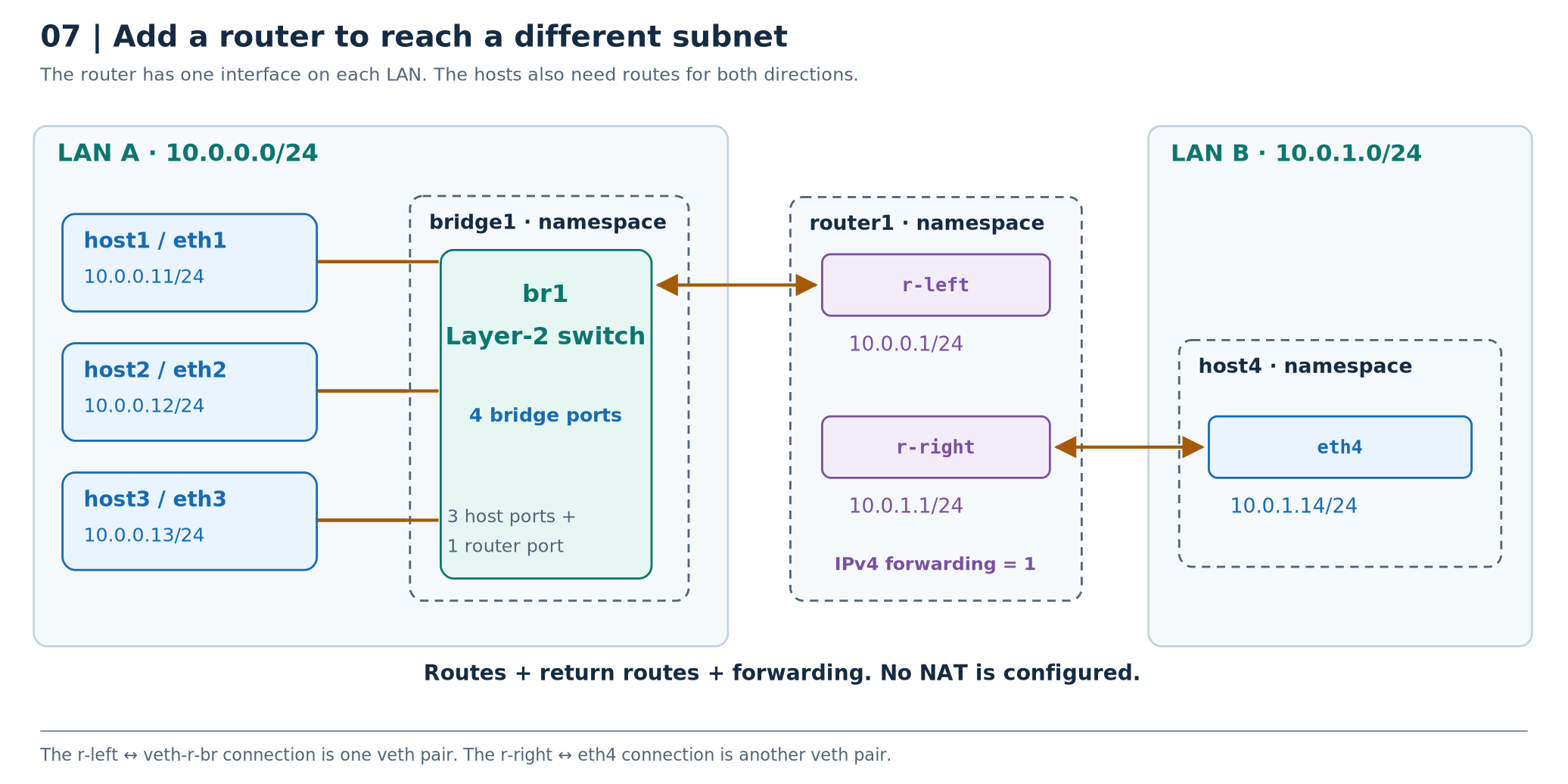
This is a compact view of Architecture C plus an extension. The left-hand switch still has the three host ports shown in Lesson 3's switched-LAN diagram. We add a fourth bridge port, veth-r-br, whose peer is the router's r-left interface. A second new veth pair connects router1/r-right directly to host4/eth4.
| Endpoint | Address | Role |
|---|---|---|
host1/eth1 | 10.0.0.11/24 | Host in LAN A |
host2/eth2 | 10.0.0.12/24 | Host in LAN A |
host3/eth3 | 10.0.0.13/24 | Host in LAN A |
router1/r-left | 10.0.0.1/24 | Router interface on LAN A |
router1/r-right | 10.0.1.1/24 | Router interface on LAN B |
host4/eth4 | 10.0.1.14/24 | Host in LAN B |
The router's interfaces are not attached to one shared bridge. It handles traffic between the subnets through IP forwarding. LAN B uses a direct Ethernet link; it does not require another switch for its two endpoints.
What happens to a ping from host1 to host4?
Host1's explicit route says to reach 10.0.1.0/24 through 10.0.0.1. Host1 therefore resolves the router's LAN A MAC, puts the packet in an Ethernet frame addressed to that MAC, and sends it through the bridge.
Router1 receives the frame as an Ethernet recipient. The enclosed IP destination is 10.0.1.14, not one of the router's own addresses. With forwarding enabled and no blocking policy, it consults its route for LAN B, resolves host4's MAC there if needed, and sends a new Ethernet frame through r-right.
The reply requires a route back. Host4 must know that 10.0.0.0/24 is reachable through 10.0.1.1; knowing only its connected LAN B route is not enough. IPv4 router forwarding · Kernel forwarding configuration
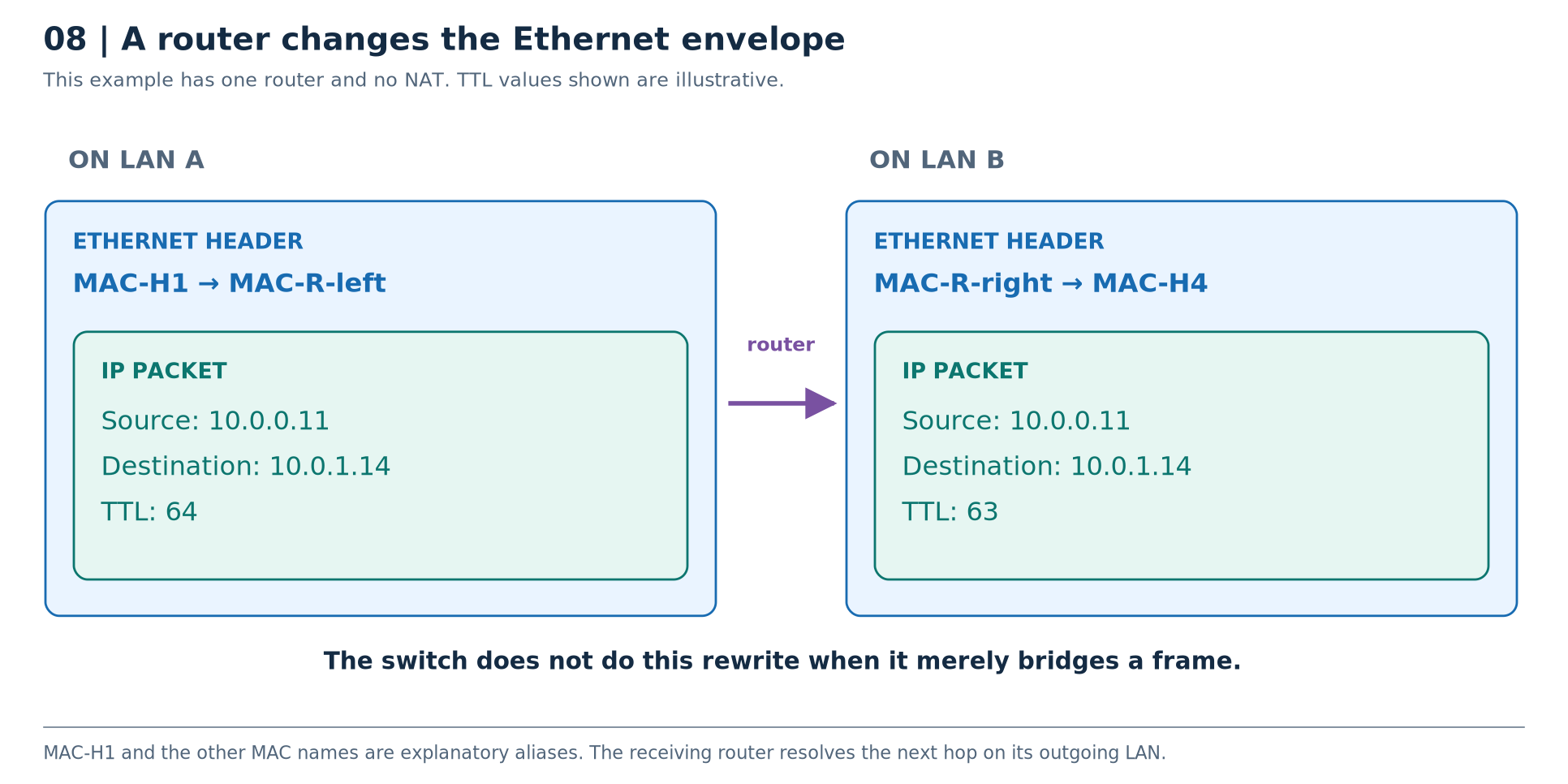
Read the important contrast: the source and destination IP addresses remain 10.0.0.11 and 10.0.1.14 in this no-NAT example. The Ethernet source and destination addresses change between LANs. The router also decrements the IPv4 TTL and updates the IPv4 header checksum; the entire packet is not byte-for-byte unchanged. Ordinary bridge forwarding does not perform that router operation. IP header · Router requirements
ARP broadcasts from LAN A are not forwarded as Ethernet broadcasts into LAN B by this router. Each LAN has its own neighbour resolution.
What this architecture is for: understanding gateways, routes, forwarding, separate broadcast domains, and return paths.
Architecture comparison: the same word can hide a different path
| Architecture | Link between separate hosts? | Switch? | Router? | Main lookup to add to your mental model |
|---|---|---|---|---|
| A. Loopback only | No | No | No | Local delivery |
| B. Direct veth | One veth pair | No | No | Connected route and neighbour resolution |
| C. Switched LAN | One veth pair per host | br1 | No | Bridge FDB, in addition to host routes and ARP |
| D. Routed subnets | Several separate links | br1 on LAN A | router1 | Forwarding route and next-hop resolution on each LAN |
Before the lab: you should now be able to trace Architecture C without calling
bridge1a switch, and explain why Architecture D needs routes that Architecture C does not.
Stage 4 - Add a router and a second subnet
Starting point: the Stage 3 LAN works; captures and the HTTP server have stopped.
Goal: demonstrate why different IP subnets need routes, forwarding, and a return path - without adding NAT.
4A. Create the router and the new host
sudo ip netns add router1
sudo ip netns add host4
sudo ip -n router1 link set dev lo up
sudo ip -n host4 link set dev lo up
Make the forwarding experiment explicit by starting with IPv4 forwarding disabled inside router1:
sudo ip netns exec router1 sysctl -w net.ipv4.ip_forward=0
Do not omit ip netns exec router1; we are not changing the normal shell's network namespace. Namespace networking resources · Forwarding setting
4B. Connect the router's left side to the existing bridge
sudo ip -n router1 link add r-left type veth peer name veth-r-br
sudo ip -n router1 link set dev veth-r-br netns bridge1
sudo ip -n bridge1 link set dev veth-r-br master br1
sudo ip -n bridge1 link set dev veth-r-br up
sudo ip -n router1 link set dev r-left up
sudo ip -n router1 addr add 10.0.0.1/24 dev r-left
This is one new veth pair: r-left ↔ veth-r-br. The bridge now has four attached ports: three hosts and one router interface.
4C. Connect the router's right side directly to host4
sudo ip -n router1 link add r-right type veth peer name eth4
sudo ip -n router1 link set dev eth4 netns host4
sudo ip -n router1 link set dev r-right up
sudo ip -n host4 link set dev eth4 up
sudo ip -n router1 addr add 10.0.1.1/24 dev r-right
sudo ip -n host4 addr add 10.0.1.14/24 dev eth4
This is another new pair, not another bridge port. r-left and r-right remain separate routed interfaces in router1.
Inspect the router:
sudo ip -n router1 -br -4 addr
sudo ip -n router1 -4 route
Expected: two connected routes, one for 10.0.0.0/24 and one for 10.0.1.0/24.
4D. Verify each directly attached side
sudo ip netns exec host1 ping -n -c 2 10.0.0.1
sudo ip netns exec host4 ping -n -c 2 10.0.1.1
Both should work even though router1 is not yet forwarding between the LANs. The pings are addressed to the router's own interfaces.
Now ask host1 how it would reach host4:
sudo ip -n host1 route get 10.0.1.14
Expected: no route to that destination in this lab yet. Merely connecting the router to the switch did not install a route in host1.
4E. Add explicit routes to the other subnet
For each host in LAN A:
sudo ip -n host1 route add 10.0.1.0/24 via 10.0.0.1 dev eth1
sudo ip -n host2 route add 10.0.1.0/24 via 10.0.0.1 dev eth2
sudo ip -n host3 route add 10.0.1.0/24 via 10.0.0.1 dev eth3
For the return path from host4:
sudo ip -n host4 route add 10.0.0.0/24 via 10.0.1.1 dev eth4
The router already has both connected routes, so it does not need a default route to forward between these two directly attached subnets.
Check both endpoint decisions:
sudo ip -n host1 route get 10.0.1.14
sudo ip -n host4 route get 10.0.0.11
Host1 should select via 10.0.0.1 dev eth1; host4 should select via 10.0.1.1 dev eth4. Extra output fields can vary.
4F. Prove that routes alone do not enable forwarding
sudo ip netns exec host1 ping -n -c 2 -W 1 10.0.1.14
Expected: failure while IPv4 forwarding is disabled in router1, even though the endpoint routes now exist.
Enable forwarding in the router namespace:
sudo ip netns exec router1 sysctl -w net.ipv4.ip_forward=1
The kernel documents that changing ip_forward also resets some IPv4 configuration parameters to host/router defaults; this is another reason to do the experiment only in the new lab namespace, not on a configured production router. Kernel sysctl documentation
Retry in both directions:
sudo ip netns exec host1 ping -n -c 3 10.0.1.14
sudo ip netns exec host4 ping -n -c 3 10.0.0.11
Also test the other LAN A hosts:
sudo ip netns exec host2 ping -n -c 2 10.0.1.14
sudo ip netns exec host3 ping -n -c 2 10.0.1.14
Expected: successful connectivity. We configured no NAT, external network, or default route.
4G. Verify the next-hop MAC, not just the destination IP
sudo ip -n host1 -4 neigh show
sudo ip -n router1 -4 neigh show
Host1 should have a neighbour entry for its local gateway, 10.0.0.1. It normally has no entry for host4's 10.0.1.14, because that destination is not directly attached to host1. Router1 can have neighbour entries on each LAN, including host1 on r-left and host4 on r-right.
This is the difference between “I know the final IP destination” and “I know the Ethernet neighbour to send to next”.
4H. Observe the Ethernet rewrite and TTL decrement
Use three terminals for this short capture experiment.
In Terminal A, capture the router's LAN A interface:
sudo ip netns exec router1 tcpdump -l -n -e -v -i r-left 'icmp'
In Terminal B, capture its LAN B interface:
sudo ip netns exec router1 tcpdump -l -n -e -v -i r-right 'icmp'
In Terminal C, send one ping:
sudo ip netns exec host1 ping -n -c 1 10.0.1.14
Compare the echo request on the two interfaces, not the request on one side with the reply on the other.
| Field | Request seen on r-left | Request seen on r-right |
|---|---|---|
| Source IP | 10.0.0.11 | 10.0.0.11 |
| Destination IP | 10.0.1.14 | 10.0.1.14 |
| Source Ethernet MAC | Host1's MAC | Router's r-right MAC |
| Destination Ethernet MAC | Router's r-left MAC | Host4's MAC |
| IPv4 TTL | For example, 64 | One less, for example 63 |
-v adds detail, including IPv4 TTL. Your initial TTL need not be assumed to be exactly 64; the important observation is the router's decrement. tcpdump output · IPv4 forwarding
Stop both captures with Ctrl+C in their respective terminals.
4I. Remove the return route and explain the failure
Delete only host4's explicit route back to LAN A:
sudo ip -n host4 route del 10.0.0.0/24 via 10.0.1.1 dev eth4
From host1:
sudo ip netns exec host1 ping -n -c 2 -W 1 10.0.1.14
Expected: no successful echo exchange. A request can still reach host4, but host4 lacks a route to send the reply to 10.0.0.11.
Inspect the missing decision:
sudo ip -n host4 route get 10.0.0.11
Restore the return route and retest:
sudo ip -n host4 route add 10.0.0.0/24 via 10.0.1.1 dev eth4
sudo ip netns exec host1 ping -n -c 3 10.0.1.14
Stage 4 checkpoint: you can explain why gateway reachability, forwarding, and a return route are three different requirements.
What these operations do
This is the checklist that prevents most beginner misunderstandings:
| Action | What it does | What it does not do |
|---|---|---|
| Enable IPv4 forwarding | Allows the routing stack to forward, subject to other configuration | Add routes, perform NAT, or override firewall rules |
These distinctions follow from the separate namespace, link, address, route, and forwarding operations described in the Linux manuals. ip-netns · ip-link · ip-address · ip-route · Forwarding
Troubleshooting checks
Use this table against the known lab topology. Do not “fix” everything at once: find the first observation that disagrees with the design.
| Ask this question | Inspect | What a discrepancy suggests |
|---|---|---|
| What path does Linux select? | sudo ip -n host1 route get 10.0.1.14 | Missing route, wrong next hop, or an unintended local/on-link decision. |
| Is the router forwarding? | sudo ip netns exec router1 sysctl net.ipv4.ip_forward | Local router reachability may work while transit traffic does not. |
| Can the reply return? | sudo ip -n host4 route get 10.0.0.11 | Forward-path delivery alone does not guarantee a round trip. |
The inspection commands correspond to Linux's separate device, address, route, neighbour, bridge, forwarding, and socket interfaces. Links · Routes · Neighbours · Bridge · Sockets
Useful distinction: “Network is unreachable” commonly points you towards a route decision; repeated unanswered ARP points towards local next-hop resolution; an HTTP connection refusal can mean that the network delivered the request but no suitable listener accepted it. These are starting clues, not universal diagnoses - use the route lookup and packet capture to establish the actual path.
Review questions
Try each answer before reading the explanation.
Host1 pings host4. Whose MAC should host1 resolve?
Answer
The MAC of its next-hop router on LAN A, at 10.0.0.1. Router1 separately resolves host4's MAC on LAN B. Host1 does not need a direct neighbour entry for host4 in this design.
The router can ping both LANs. Does that prove it forwards between them?
Answer
No. Traffic originated by the router and traffic forwarded on behalf of other hosts are different cases. The forwarding-disabled experiment demonstrated that distinction.
All routes exist on host1 and the router. Why might a ping to host4 still fail?
Answer
Host4 may lack a return route. Other possibilities include a disabled link, neighbour failure, filtering, or disabled router forwarding. Use the actual route and packet observations rather than choosing one diagnosis automatically.
What changes when an IP packet crosses the router in our no-NAT lab?
Answer
The Ethernet header is rebuilt for the outgoing LAN, using different source and destination MAC addresses. The IP source and destination remain the endpoint addresses; TTL decreases and the IPv4 header checksum changes.
Cleanup - Remove only the resources you created
Stop each lab tcpdump, Python HTTP server, and interactive namespace shell first. Ctrl+C stops the foreground captures and servers; exit leaves a shell. Removing a namespace's registered name does not necessarily destroy the namespace if processes or other references still keep it alive. Namespace deletion behaviour
Check for processes in every namespace you actually created:
sudo ip netns pids host1
sudo ip netns pids host2
sudo ip netns pids host3
sudo ip netns pids bridge1
sudo ip netns pids router1
sudo ip netns pids host4
An empty result is expected before deletion. If a command returns process IDs, identify and stop your lab processes first. Do not kill unfamiliar processes or delete a namespace you do not own. A namespace not created because you stopped at an earlier stage will produce a “not found” error; omit that namespace from cleanup.
After Stage 4, remove the six lab namespaces explicitly:
sudo ip netns del host1
sudo ip netns del host2
sudo ip netns del host3
sudo ip netns del host4
sudo ip netns del router1
sudo ip netns del bridge1
Their virtual devices disappear when the namespaces are released; veth peer deletion also removes the connected peer. We did not create lab devices in the normal shell's network namespace, so there is no physical interface to restore. Network namespace device lifecycle · veth
In the same Terminal A that created LAB_WEB, after the HTTP server has stopped, remove the test page and its now-empty temporary directory:
rm -- "$LAB_WEB/index.html"
rmdir -- "$LAB_WEB"
unset LAB_WEB
Do this only for the temporary directory created during Stage 1. There is no reason to use rm -rf or remove other temporary files.
Finally:
sudo ip netns list
The lab names should be absent. Other namespaces, if any, should remain untouched.
The one-minute reconstruction
Before opening a terminal, describe the network in these terms:
The namespace owns the networking context. The interface is a connection point. A veth pair connects two such points. A bridge joins multiple Ethernet links by switching frames. An IP route selects the outgoing path. ARP finds the local next-hop MAC. The bridge FDB locates that MAC on a switch port. A router forwards packets between IP networks. Loopback stays local to its namespace.
Those sentences summarise the concepts and the paths you built; they are not a substitute for knowing which object owns each piece of configuration.
Sources and validation
How the references are used
The lesson uses original explanations, diagrams, and worked examples, with links to the relevant primary documentation beside the technical concepts. The Linux man-pages and iproute2 manuals define the command behaviour; kernel documentation explains forwarding, bridging, and device semantics; RFCs define the protocol mechanisms. The source pages were checked while preparing this edition.
| Subject | Primary references |
|---|---|
| Linux network isolation | network_namespaces(7), namespaces(7), ip-netns(8), lsns(8) |
| Interfaces and addressing | netdevice(7), ip-link(8), ip-address(8), operational states |
| Virtual links and switches | veth(4), kernel bridge documentation, bridge(8), TUN/TAP |
| Routing and neighbours | ip-route(8), ARP implementation, ip-neighbour(8), IPv4 forwarding sysctl |
| Protocols | IPv4, ARP, ICMP, TCP, UDP, CIDR, router requirements |
| Practical inspection | ping, tcpdump, ss, curl |
You do not need to read all the specifications before doing the lab. Use a linked manual when you want to verify a detail or explore an option beyond the lesson.
Validation record supplied with the course
The following record describes checks reported with the supplied course. These Linux lab commands were not rerun as part of adding this blog post.
The documented setup commands were exercised in disposable Linux user, mount, and network namespaces, not on the reader's machine. 43 checks passed, covering separate loopback contexts, direct veth connectivity, the link-down experiment, all six host-to-host directions on the three-host bridge, bridge membership and MAC learning, ARP/ICMP behaviour, listener binding, and cleanup. The Stage 4 interfaces, address plan, routes, and forwarding-disabled failure were also checked.
Testing limits: this sandbox denies writes to /proc/sys, so enabling router forwarding and the subsequent successful routed exchanges, routed packet captures, and missing-return-route experiment were not runtime-validated here. Those commands and explanations were reviewed against the kernel and routing documentation. tcpdump was unavailable in the validation environment: the switched-LAN packet observations were verified using native Linux packet sockets, while the documented tcpdump options were checked against its manual.
The validation environment used 6.18.44 and ip utility, iproute2-6.15.0, libbpf 1.5.0. Shell syntax, internal links, and image references were checked separately.
Illustrative outputs in the teaching sections remain labelled as examples. Interface indices, automatically generated MAC addresses, exact link states, and neighbour-cache timing should not be treated as fixed values.
A compact command reference
These commands are for the completed relevant lab stage; router1 and host4 do not exist before Stage 4.
| Task | Command |
|---|---|
| Interfaces in the current namespace | ip -br link |
| Addresses in the current namespace | ip -br addr |
| Named network namespaces | sudo ip netns list |
| Visible namespaces of all types | sudo lsns |
| Visible network namespaces | sudo lsns -t net |
| Addresses in a lab namespace | sudo ip -n host1 -br addr |
| Main IPv4 routes | sudo ip -n host1 -4 route |
| Local IPv4 route table | sudo ip -n host1 -4 route show table local |
| Route lookup for a particular destination | sudo ip -n host1 route get 10.0.1.14 |
| IPv4 neighbour mappings | sudo ip -n host1 -4 neigh |
| Bridge membership | sudo ip -n bridge1 link show master br1 |
| Bridge MAC forwarding database | sudo ip netns exec bridge1 bridge fdb show br br1 |
| Link counters | sudo ip -n host1 -s link show dev eth1 |
| Listening TCP sockets | sudo ip netns exec host1 ss -lntp |
| ARP and ICMP capture | sudo ip netns exec host1 tcpdump -l -n -e -i eth1 'arp or icmp' |
ip netns list enumerates registered names under /var/run/netns; it is not a universal list of every network namespace. The initial namespace normally has no registered name there. lsns can reveal namespaces associated with processes, including unnamed ones, but its view depends on privileges and accessible namespace references. Use the two tools together rather than assuming the lists must match. Named namespaces · lsns manual
The final teach-back exercise
Without looking at the commands, sketch the switched topology. Put every interface inside the correct namespace, connect the exact veth peers, and mark which endpoints are bridge ports. Explain why enabling loopback does not connect the hosts.
Then add the router and host4. Write the two IP prefixes, the gateway on each LAN, and a route for each direction. Describe the first echo request using three separate questions: Which route? Which neighbour MAC? Which bridge port?
Return to the relevant diagram when you cannot answer one of those questions. That missing relationship is the concept to revisit - not another command to memorise.